

4-Steps Setup Guide
Integration is very simple and takes around 3 minutes. Our platform is designed for rapid deployment. If we don’t currently support an app you use, please contact us at info@codaro.dev and we commit to providing support for it within 24-48 hours.
1
Step 1: Connect Version Control System (VCS)
Codaro requires read-access to your VCS to track code changes, commits, and Pull Request (PR) activity. This data forms the ground-truth of all engineering work.You must be an Owner or Admin of the organization to authorize this step.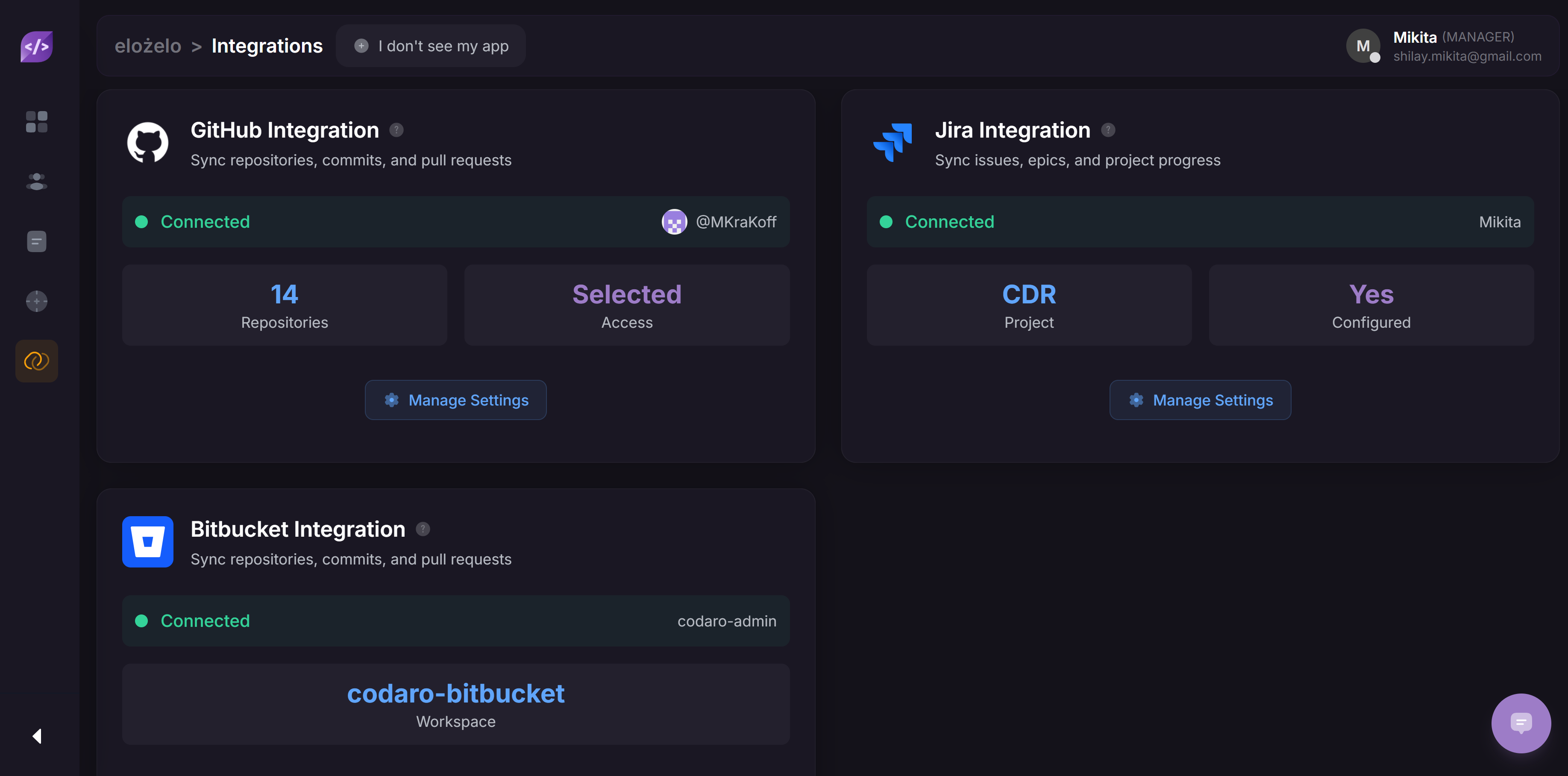
- Navigate to Integrations Tab in your Team in the Codaro web app.
- Select your provider: GitHub or BitBucket.
- Follow the OAuth prompt and select the repositories you want Codaro to analyze.
- Why we need this: This allows us to generate code activity reports and summaries, find issues in the code, and have the best data-driven insights. More strategically, this raw data is the input for the Smart Alert System and Agentic Engine, giving us the huge context necessary to predict and intervene before problems occur.
2
Step 2: Connect Task Management System (TMS)
Connecting your TMS is vital for providing business context. This step links code activity (from Step 1) to specific project goals and deadlines, which is essential for our predictive AI.You must have the necessary Admin rights within your TMS to configure the connection and map projects.
- In the Codaro web app, navigate to Integrations Tab.
- Select your provider: Jira (contact info@codaro.dev, if your App is missing).
- Authenticate and select your TMS Project Identifiers (e.g.,
PROJ,MVP,APP) in the popup.
- Why we need this: This enables Codaro to link commits to your tasks, allowing for progress tracking and aggregation of business context for the Agentic Engine. This context is critical for predictive alerts like
TASK_STARTEDorTASK_STALLED.
Context Linking Tip: To ensure accurate linking between your code and tasks, include the Project Identifier (e.g.,
PROJ-692) in your commit message or branch name (e.g., features/PROJ-692-new-api).3
Step 3: Invite Team Members
While Steps 1 and 2 activate the core platform, inviting your team is how Codaro begins to deliver value at scale.
- Go to the Team tab in Codaro and click the Invite Team Member button.
- Invite team members via their email addresses. They will need to accept the invitation from the mail they recieve to gain access.
- Once logged in, individual team members can connect their personal integrations (e.g., Jira/Github) and, crucially, download the IDE Plugin (Step 4).
4
Step 4: Download the Developer IDE Plugin
For developers, the IDE Plugin is the primary interaction point with Codaro. It is the tool that preserves flow state and provides hyperlocal, real-time data to the Agentic Engine for comprehensive workflow analysis.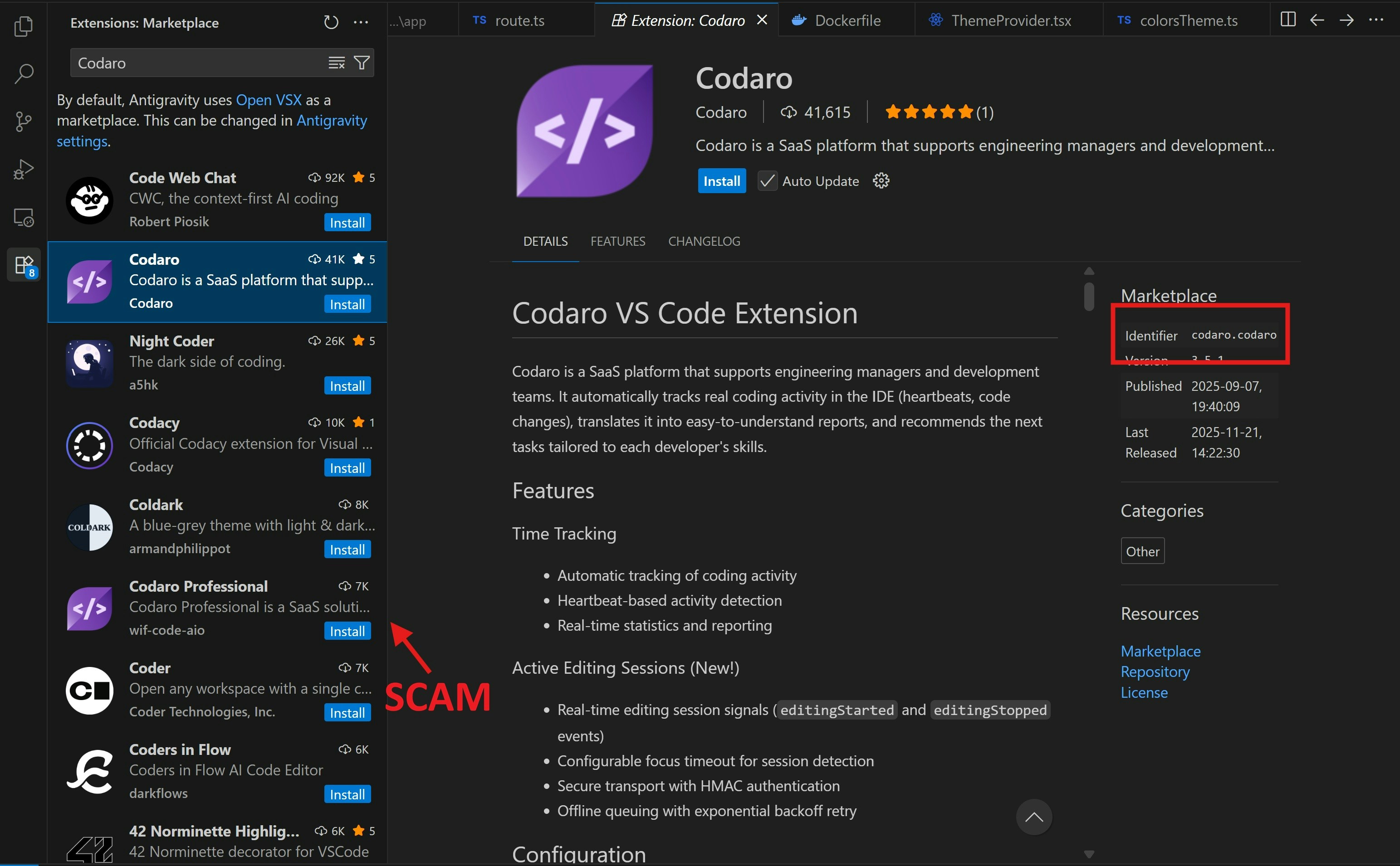
- Search for “Codaro” in the VS Code Marketplace, VSX Registry Marketplace or JetBrains Marketplace and click Install.
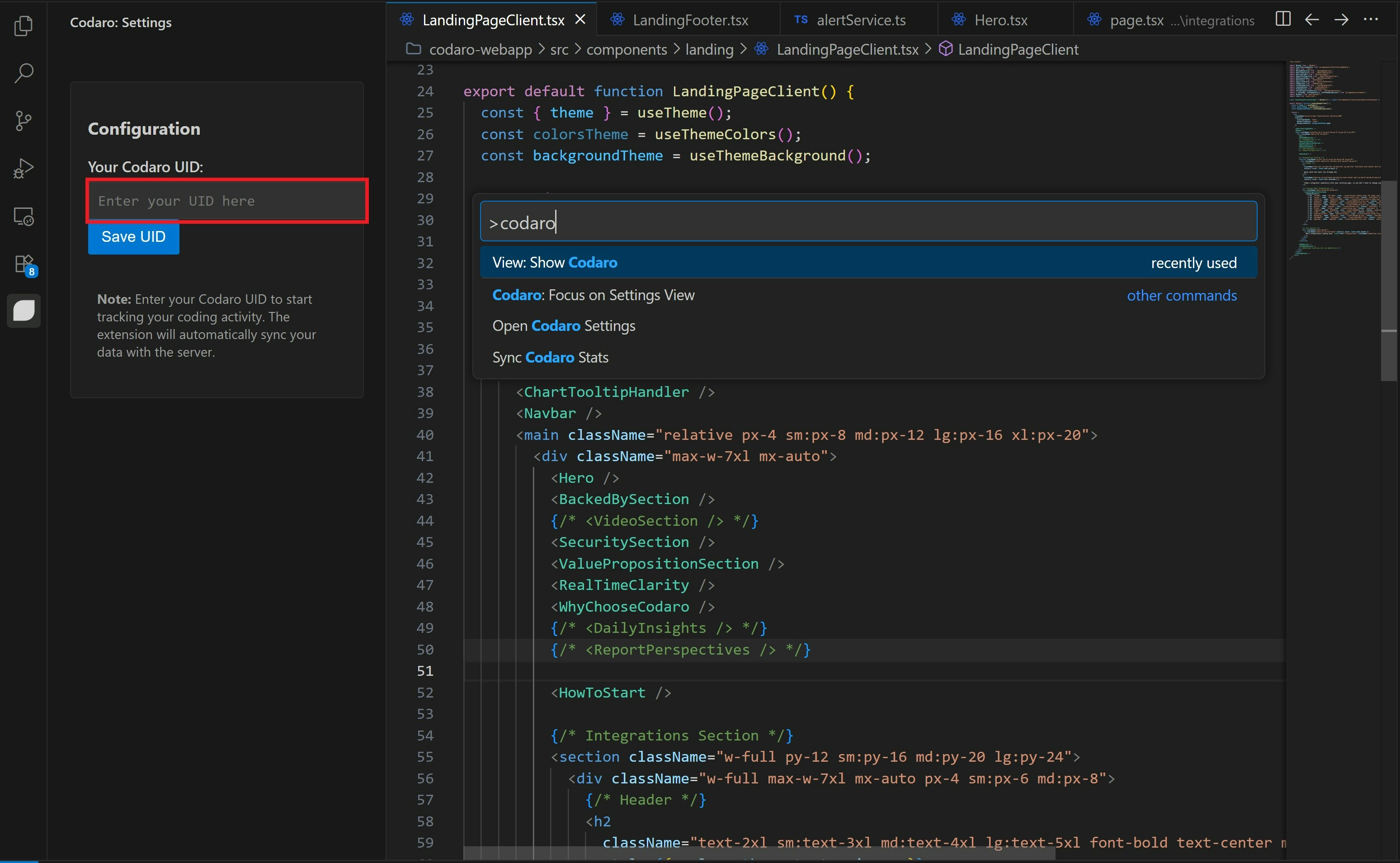
- Use the shortcut
Ctrl+Shift+P(orCmd+Shift+Pon Mac) and type “View: Show Codaro” to open the sidebar. - Copy your UID from the Integrations > IDE Extension tab of your dashboard, paste it into the sidebar input, and click Save UID to link your workspace.
- Why we need this: The plugin sends a silent ‘heartbeat’ (activity data) which is crucial for determining Flow State Index and generating hyperlocal alerts like the
COLLISION_WARNING. This deep, real-time context allows Codaro to analyze developer workflow and provide insights into who is online or may potentially need a quick sync or assistance.
Verify Your Extension
To avoid malicious clones, ensure you are using the official extension with the unique identifier:
To avoid malicious clones, ensure you are using the official extension with the unique identifier:
codaro.codaroIntegrations
See the full list of supported Apps for Integrations in Codaro web app
Security and Privacy
Codaro is built on a foundation of enterprise-grade security and strict data privacy standards. We commit to maximum data isolation and control, and we never use your proprietary code for training AI models.View Full Security & Compliance Details
Detailed documentation on data isolation, compliance (GDPR/CCPA), PII handling, retention policies, and our options for On-Premise and Self-Hosted deployment.